iOS pull request previews

Open any iOS pull request build.Keep your branch.

SimPreview adds a Run in Simulator button to every pull request. Click it to open that commit’s iOS build on your Mac—without switching branches or rebuilding.

  • Nothing compiles on your Mac
  • Uses the Simulator build from CI
  • Free during beta
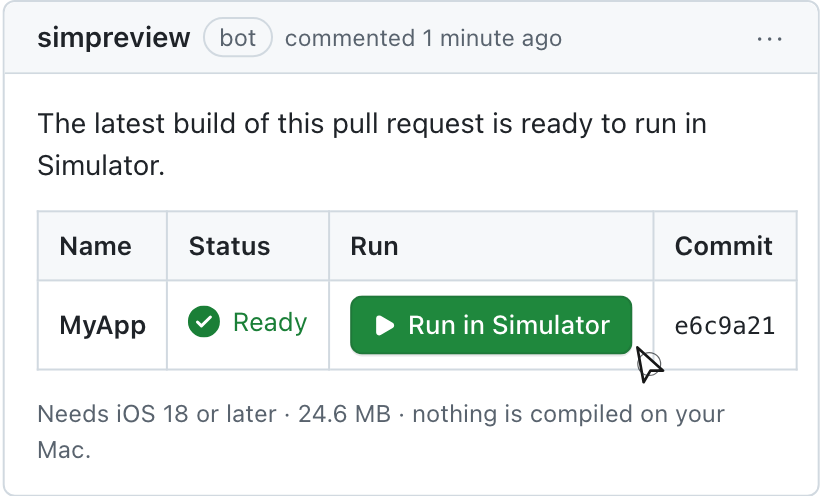
A pull request on GitHub with a Run in Simulator link, ready to review.

A pull request on GitHub with a Run in Simulator link, ready to review.

Reviewing an iOS change shouldn’t interrupt your own.

Trying a teammate’s change often means stashing your work, switching branches, resolving dependencies, and rebuilding. That friction turns hands-on review into diff review.

Without SimPreviewmanual
  1. Pause and save your current work interrupt
  2. Check out the pull request branch switch
  3. Resolve packages and dependencies wait
  4. Build the app in Xcode wait
  5. Navigate to the changed screen test
  6. Switch back and rebuild your branch repeat
ResultYour work is interrupted
With SimPreviewevery PR
Run in Simulator

Click once on the pull request. Its iOS build opens in Simulator on your Mac.

Your branch stays checked outYour Xcode build stays warmThe exact build CI made, not a rebuild
What happens after you click
  • ClickGitHub
  • DownloadMac
  • Verifysecure
  • OpenSimulator
ResultThe change is running

From pull request to Simulator. Three simple steps.

CI produces the build. SimPreview attaches it to the pull request. The Mac app opens it in Simulator.

01

CI saves the build

Add SimPreview to the pull request workflow. If CI already produces a Simulator build, SimPreview uploads that output instead of compiling it again.

02

A Run button appears

As soon as the build is uploaded, SimPreview updates one pull request comment. It doesn’t wait for unrelated tests to finish.

03

Your Mac opens it

The Mac helper downloads and verifies the build, then opens it in Simulator. Each reviewer installs the helper once.

Nothing runs on a remote Mac. The build is stored privately, and Simulator runs locally on the reviewer’s machine. Your source code never leaves GitHub.

Let every reviewer try the change themselves.

For iOS engineers

Test the change without leaving your branch.

Try the interaction, rotate the device, and check the edge cases. Your own project stays exactly where you left it.

  • Switch between pull request builds without a checkout
  • Review agent-written PRs as fast as they arrive
  • Catch clipped layouts and broken navigation before approving
For design, product, and QA

Review the working app, not a recording.

No cloning or local build is required. Open the pull request build and test it directly in Simulator.

  • Nothing to set up beyond Xcode’s Simulator and the Mac helper
  • Access follows the repository, so only your team can run it
  • File bugs against the actual build, not a screenshot

Not TestFlight. Not a Mac in the cloud.

TestFlight gets a build onto a real phone. SimPreview gets a specific pull request into Simulator, in minutes, on your own Mac. Different job.

What you getSimPreviewTestFlightCheck out & build
A button on every pull requestYesNoNo
Nothing to compile on your MacYesYesNo
Your branch and Xcode stay untouchedYesYesNo
Runs in Simulator, locallyYesNoYes
No App Store Connect or signingYesNoYes
Available as soon as CI uploads the buildYesNoNo
Reviewers don’t need the repo clonedYesYesNo

Set it up once. Then every pull request works the same way.

Connect the repository, add the workflow step, and install the Mac helper.

  1. 1
    Add one step to your workflowConnect the repository on GitHub, then drop simpreview/build into the job that already builds on pull requests. The guided setup writes the instruction for your agent.
  2. 2
    Install the Mac helperEach reviewer installs it once. It handles the download, the check, and the launch.
.github/workflows/simpreview.ymlValid workflow
name: SimPreview

on:
  pull_request:

jobs:
  preview:
    runs-on: macos-latest
    steps:
      - uses: actions/checkout@v4
      - uses: aryamansharda/simpreview-build@v1        with:
          scheme: MyApp

Give your next iOS pull request a Run button.

Open the working build before you approve the change. Free during beta, with no card required.

Get started with GitHub See what’s included